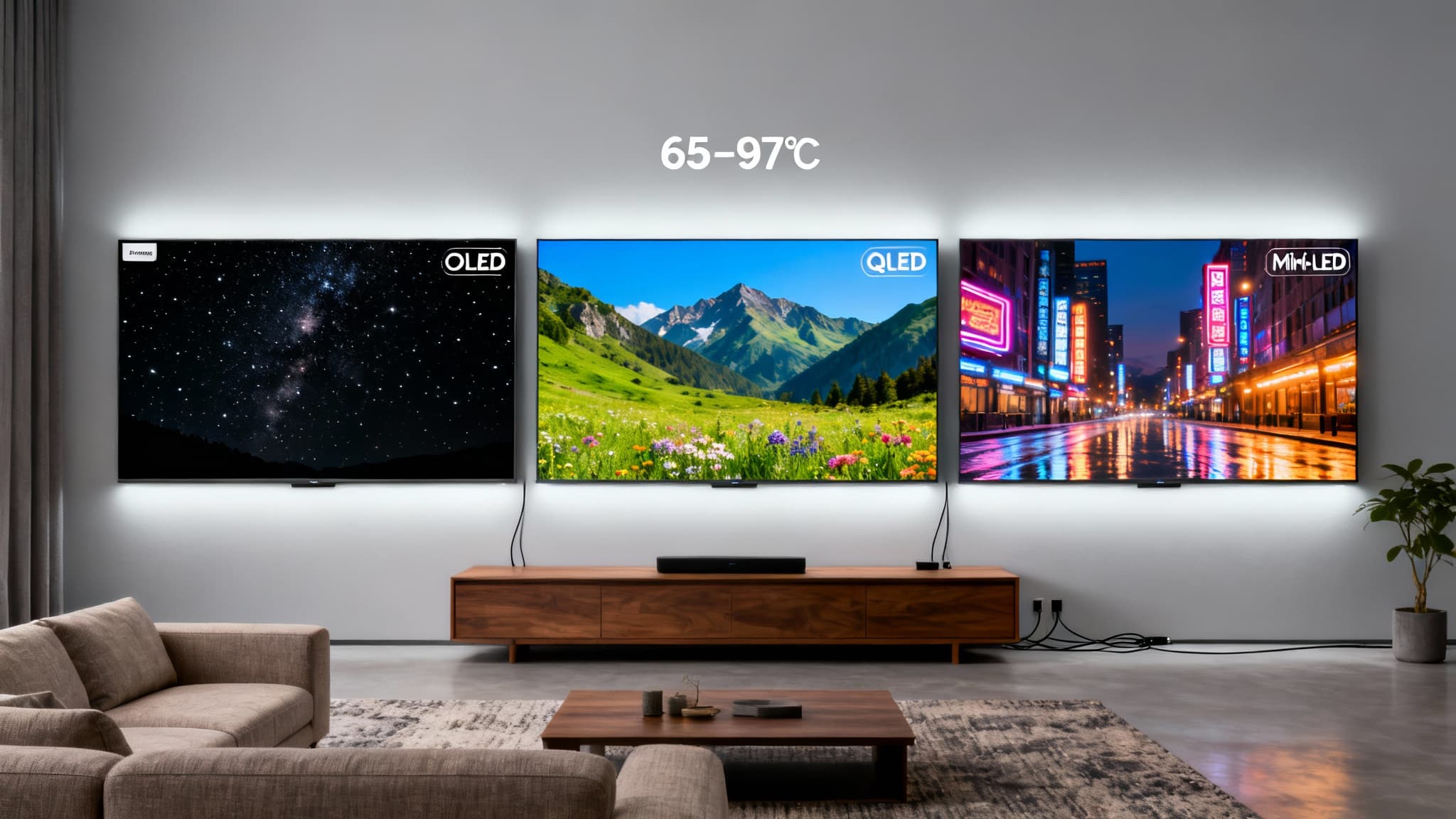

If you’re shopping for a new 4K TV in the United States, you’ll see three display technologies everywhere: OLED, QLED, and Mini‑LED. Each can look stunning in the right setting—but they’re optimized for different rooms, viewing habits, and budgets. This guide breaks down how they work, what the acronyms really mean, and how to choose the best 4K TV for movies, sports, gaming, and bright living rooms.
What these technologies actually are
- OLED (Organic Light‑Emitting Diode): Each pixel emits its own light and can turn completely off, delivering perfect blacks, pixel‑level dimming, and exceptional contrast. No backlight required.
- QLED (Quantum‑Dot LED): A quantum‑dot layer boosts color and brightness on a traditional LED‑backlit LCD panel. Think of QLED as “LCD + quantum dots + strong backlight,” not a new panel type.
- Mini‑LED: Still an LCD TV, but with thousands of tiny LEDs grouped into many local dimming zones. This enables far better contrast and less blooming vs older LED TVs, while achieving very high brightness.
In short: OLED = self‑emissive, QLED/Mini‑LED = LCD with advanced backlighting and color tech.
Picture quality at a glance
- Black levels and contrast: OLED is unmatched. Infinite contrast, perfect blacks, zero blooming around bright objects on dark backgrounds.
- Brightness and punch: QLED and Mini‑LED often win for sheer brightness (great for sunlit rooms and HDR with specular highlights). Mini‑LED typically outperforms most standard QLEDs due to finer local dimming.
- Color volume: QLED and Mini‑LED with quantum dots deliver rich color at high brightness. Newer QD‑OLEDs close the gap with superb color at lower brightness than top Mini‑LEDs.
- Motion: OLED’s near‑instant pixel response provides exceptionally clean motion. Top Mini‑LED/QLED sets also perform well with high refresh rates and motion processing.
- Viewing angles: OLED excels; color and contrast remain consistent off‑axis. Many QLED/Mini‑LED TVs lose contrast and color off‑center unless they use special wide‑angle layers.
Room and use‑case recommendations
- Bright living rooms with lots of windows: Mini‑LED or QLED. You’ll appreciate the higher peak brightness, strong anti‑reflection coatings, and punchy HDR in daylight.
- Home theater/dark room movie nights: OLED. The perfect blacks and contrast make movies, sci‑fi, and nighttime scenes look cinematic.
- Mixed use (daytime TV + nighttime movies): Premium Mini‑LED if your room is bright; OLED if you can dim the lights and want the most cinematic look.
- Sports: Mini‑LED/QLED for high brightness and vivid greens/blues during daytime games; OLED also looks fantastic thanks to ultra‑fast response and clean motion.
- Gaming: Both can be excellent. Look for HDMI 2.1 (4K 120Hz), Variable Refresh Rate (VRR), Auto Low Latency Mode (ALLM), and low input lag. OLED gives incredible response; top Mini‑LEDs give bright HDR and minimal blooming.
HDR formats and why they matter
- HDR10: The baseline HDR standard supported by almost every TV and streaming app.
- Dolby Vision: Dynamic metadata fine‑tunes HDR scene by scene; widely used on Netflix, Disney+, Apple TV, and UHD Blu‑ray.
- HDR10+: Similar to Dolby Vision, but supported on fewer platforms in the U.S. than Dolby Vision.
Tip: For U.S. streaming, Dolby Vision support is a strong plus. Bright sets (Mini‑LED/QLED) help HDR pop in daylight; OLED’s contrast makes HDR look nuanced in darker rooms.
Burn‑in and longevity
- OLED: Modern panels include pixel‑shift and screen refresh to mitigate image retention. Normal, varied use is generally safe. If you leave static logos, news tickers, or HUDs on screen for many hours every day over years, a bright Mini‑LED may be safer.
- QLED/Mini‑LED: No practical burn‑in risk. Good for 24/7 news or signage‑like use.
Anti‑reflective coatings and ambient light
- OLED: Anti‑reflective layers are good, but peak brightness is lower than top Mini‑LEDs. If you can control light, OLED shines.
- Mini‑LED/QLED: Often have excellent anti‑reflection plus high brightness that fights glare—ideal for sun‑splashed living spaces.
Processing, upscaling, and motion handling
- Upscaling: Look for strong video processing to make cable TV and HD streams look crisp on a 4K panel. Flagship Mini‑LED/QLED lines often tout advanced AI upscaling; recent OLEDs also do very well.
- Motion: Gamers should prioritize 120Hz panels with VRR and low input lag. Sports watchers benefit from motion interpolation options—just don’t overdo it or you’ll get the “soap‑opera effect.”
Sizes, seating distance, and wall mounting
- 55–65 inches: Great for apartments or mid‑size living rooms. At 8–10 feet viewing distance, a 65‑inch 4K TV feels immersive.
- 75–85 inches: Best for large rooms and 10–12 feet distances. Mini‑LED often offers compelling value at these larger sizes.
- Wall mounting: OLEDs are extremely thin and mount flush; Mini‑LED/QLED sets vary. Ensure your mount supports the TV’s weight and VESA pattern, and run certified Ultra High Speed HDMI cables for 4K 120Hz.
Price ranges and value
- OLED: 55–65 inches often land in the mid‑to‑upper midrange; larger OLEDs (77–83″) can be premium priced. Holiday and Super Bowl‑season deals can be excellent.
- Mini‑LED: Broad range from value to flagship. You’ll find bright, high‑contrast performance at aggressive prices compared to top OLEDs at large sizes.
- QLED (non‑Mini‑LED): Usually more affordable than Mini‑LED with strong color and brightness, but lower contrast in dark scenes. Great bang for the buck in bright rooms.
Connectivity and features to look for
- HDMI 2.1 on at least two ports for 4K 120Hz consoles and future‑proofing.
- eARC for high‑quality audio passthrough to a soundbar or AVR.
- Wi‑Fi 6 (if available), robust app store (Google TV, Fire TV, Tizen, webOS), and voice control compatibility (Alexa, Google Assistant, Apple AirPlay).
- Calibrated or filmmaker modes for accurate out‑of‑the‑box picture, plus room‑light sensing if you want set‑and‑forget brightness.
Quick pros and cons
OLED
Check Also
- Pros: Perfect blacks, infinite contrast, outstanding viewing angles, elite motion, stunning dark‑room performance.
- Cons: Not as bright as top Mini‑LEDs; small risk of image retention with heavy static content.
Mini‑LED
- Pros: Very high brightness, strong HDR punch, excellent for bright rooms, far better local dimming vs older LEDs, no burn‑in worries.
- Cons: Some blooming in challenging scenes; off‑axis color/contrast can drop relative to OLED.
QLED (standard LED with quantum dots)
- Pros: Bright, colorful, generally budget‑friendly, great for daytime viewing and sports.
- Cons: Lower native contrast than Mini‑LED and OLED; blooming more noticeable in dark scenes.
Recommendations by user type
- Movie lover in a dim room: Choose OLED. You’ll get unmatched black levels and cinematic contrast. If you watch a lot of letterbox films at night, you’ll appreciate the inky black bars.
- Family room with windows and daytime TV: Choose Mini‑LED. The extra brightness and anti‑glare help maintain punchy images in ambient light.
- Gamer with PS5/Xbox Series X/PC: Either top OLED or high‑end Mini‑LED with HDMI 2.1, 4K 120Hz, VRR, and low input lag. OLED gives instant pixel response; Mini‑LED gives bright HDR and minimal risk with static HUDs.
- Large‑screen value seeker (75–85″): Consider Mini‑LED/QLED for aggressive pricing at big sizes. For the very best picture in a dark theater‑like environment, budget permitting, a large OLED is stunning.
Setup tips for better picture
- Use Filmmaker/Cinema mode for accurate color and tone‑mapping.
- Enable local dimming (Mini‑LED/QLED) at a medium‑high setting for deeper blacks with minimal artifacts.
- Calibrate basic settings: Turn off excessive motion smoothing, set color temperature to Warm 1/Warm 2, and match the TV’s RGB range to your devices.
- For gaming: Enable Game Mode, confirm 4K 120Hz, VRR, and ALLM are active, and use certified Ultra High Speed HDMI cables.
Bottom line
- Choose OLED if you prioritize pure picture quality in a controlled‑light room—perfect blacks, elite contrast, and gorgeous movies at night.
- Choose Mini‑LED if you need high brightness for sunny rooms, want impressive HDR highlights, and prefer no worries about static content.
- Choose QLED if you want bright, colorful performance at a more affordable price and you mainly watch during the day.
With these factors in mind—room lighting, content, gaming needs, size, and budget—you can confidently pick the 4K TV that fits your home and how you watch.