
Transforming the Game Day Experience: The Evolution of YouTube TV Split Screen Multi-View for Sports
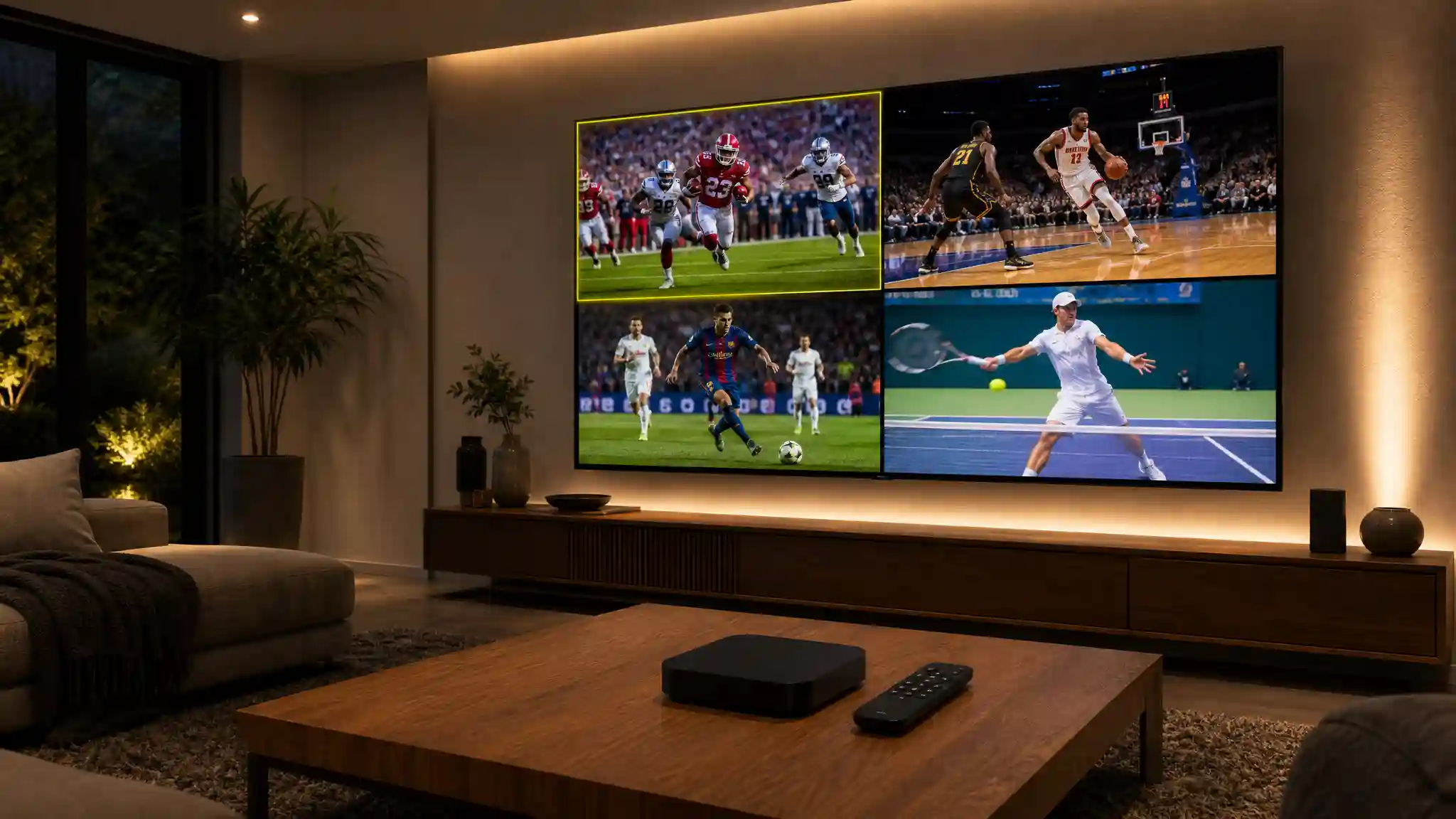
Live sports broadcasting continues to experience rapid technological shifts as cord-cutting fans demand more control over their viewing habits. Traditional television cable packages often force fans to flip endlessly between channels during busy game days, creating frustration and missed clutch moments. YouTube TV addresses this challenge directly with major enhancements to its multiview ecosystem. The platform transforms the standard living room setup into a personal broadcast control room, giving sports enthusiasts the power to watch multiple live events simultaneously on a single screen without complex hardware setups.
Recent upgrades to the multi-stream architecture focus on flexibility, customization, audio management, and expansive cross-device availability. Whether tracking intense college football rivalries, fast-paced NFL Sunday matchups, March Madness upsets, or international soccer tournaments, the latest multi-screen improvements offer sports lovers seamless command over their live game streams.
Understanding YouTube TV Multi-View Architecture
Traditional picture-in-picture modes and client-side multi-window features typically place heavy computational burdens on local streaming hardware. Decoding several high-definition video streams locally often leads to overheating streaming sticks, frame-rate drops, buffering, and delayed audio synchronization.
YouTube TV takes an innovative server-side processing approach to solve this engineering bottleneck. The service handles the complex video decoding and multiplexing on Google’s robust cloud infrastructure, combining up to four live high-definition sports broadcasts into a single pre-rendered video stream before sending it to the user device. This technique ensures that even budget-friendly smart TVs and older media players render smooth, high-frame-rate sports action without stuttering or crashing.
Breakthrough Updates: Moving from Pre-Set Grids to Custom Multiview
When Google originally launched multi-view functionality, users had access only to pre-curated combinations selected by the YouTube TV algorithm. Viewers often had to accept predetermined channel sets, which did not always align with their preferred regional teams or fantasy rosters.
The newest platform updates introduce dynamic customization capabilities that redefine user agency:
- Build Your Own Multiview: Viewers can now select specific live sporting events from an active games menu and assemble custom two-, three-, or four-game grid arrangements on the fly.
- Expanded Sport Category Blends: The system removes previous genre locks, allowing subscribers to pair a live NFL broadcast with a high-stakes NBA game, a Premier League soccer derby, or a WNBA matchup on the same screen.
- Smart Contextual Suggestions: The interface provides intelligent multi-game recommendations based on individual viewing history, favorite franchises, and regional broadcast availability.
- Instant Dynamic Layout Switching: Viewers can seamlessly switch between quad-screen splits, dual-stream side-by-side modes, and triple-box dynamic views with minimal remote navigation.
Seamless Audio Control and Real-Time Interaction
Managing multiple high-energy broadcasts simultaneously requires intuitive audio controls. Nothing ruins a multi-game session faster than clashing commentary tracks or confusing audio switching.
YouTube TV implements a dynamic white-border highlight mechanism to make audio navigation easier. Using the directional pad on a standard streaming remote, viewers can move the focus box over their preferred quadrant. The audio track then switches to match the highlighted game without interrupting the video.
Furthermore, the platform aims to reduce audio-video desynchronization when viewers toggle between streams. This helps ensure that referee whistles, crowd reactions, and play-by-play calls remain aligned with the on-screen action. Viewers can also use closed captions for secondary boxes, allowing them to follow commentary on silent quadrants while listening to the primary broadcast.
Cross-Platform Expansion: Bringing Multi-Stream to Mobile and Web
Initially associated with connected living room televisions, the multi-view experience has become increasingly relevant across different smart devices. Mobile streaming optimization allows fans to follow multiple live sports broadcasts on compatible smartphones and tablets.
The mobile interface can adapt to vertical and horizontal screen orientations. On tablets and foldable screens, users can benefit from a larger viewing area while monitoring several games. Web browser support also helps desktop users follow multiple live feeds alongside fantasy sports dashboards, game statistics, and live social media updates.
Optimizing Your Setup for High-Performance Multi-Screen Streaming
Although server-side processing reduces the workload on the user’s device, multi-game streaming still requires a stable internet connection and a suitable display setup.
- Ensure Adequate Bandwidth: Use a reliable internet connection that can support high-quality video streaming across multiple live sports windows.
- Prioritize 5GHz Wi-Fi or Ethernet: Connect streaming devices through Ethernet or a stable 5GHz Wi-Fi network to help reduce interruptions and packet loss during busy viewing periods.
- Calibrate Television Motion Settings: Use a dedicated sports picture mode when available. Adjust motion settings carefully to reduce blur during fast-moving plays.
- Use Cloud DVR Features: Cloud DVR functionality can help viewers record games, pause live content, and return to important moments without missing key action.
The Future of Live Sports Streaming on YouTube TV
The continued development of multiview technology reflects the growing demand for flexible live sports streaming. Future improvements may include more detailed real-time statistics, fantasy sports integrations, interactive viewer features, and personalized camera-angle options.
By reducing the need to switch between channels and giving viewers more control over their viewing layout, split-screen streaming creates a more convenient game-day experience. Fans can follow multiple competitions from one screen while staying connected to the teams, leagues, and events they enjoy most.
Recommended Streaming Hardware on Amazon.com
To enjoy a smooth multi-view sports experience with responsive navigation, users can consider a compatible streaming device such as the Chromecast with Google TV (4K).
This device offers access to popular streaming applications, supports high-definition video playback, and includes a remote control designed for simple navigation. Before purchasing, users should confirm that the device is compatible with their television, internet connection, and preferred streaming services.