
Best Studio Cameras for Tethered Shooting: A Comprehensive Guide
In modern professional photography, shooting tethered has become almost essential for studio work. Whether you are a portrait photographer, a fashion shooter, or a commercial content creator, being able to connect your camera directly to a computer and view images in real time dramatically improves your workflow. Choosing the best studio camera for tethering is not just about megapixels; it’s about stability, compatibility, ergonomics, and color accuracy.
This guide explains what to look for in a tether‑ready camera, which models are popular among professionals, and how to optimize your tethering setup for an efficient, reliable studio experience.
What Is Tethered Shooting and Why Does It Matter?
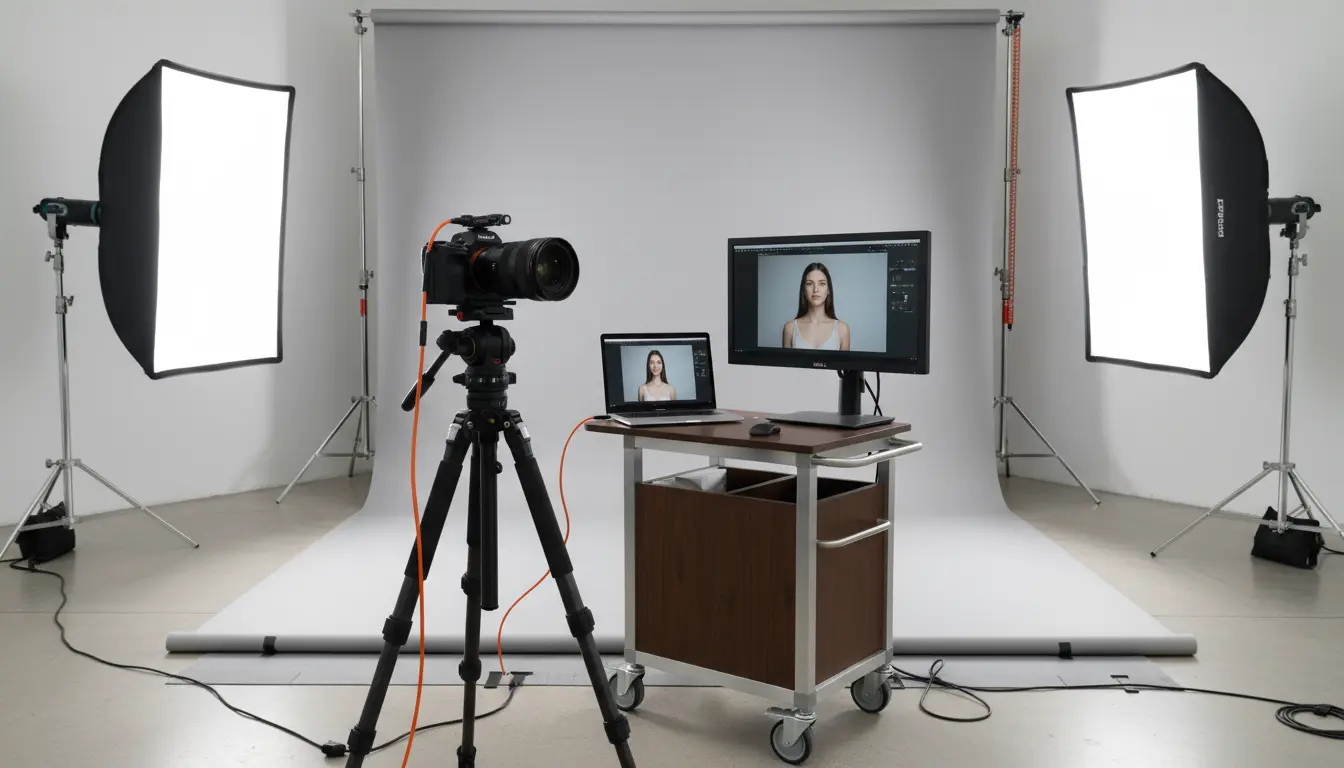
Tethered shooting means connecting your camera to a computer (usually via USB‑C, USB 3.0, or sometimes HDMI) so that every shot appears immediately on a larger screen. Specialized tethering software like Capture One, Adobe Lightroom, or proprietary camera utilities imports the images in real time.
Benefits of tethered shooting in the studio include:
- Instant image review: You can check sharpness, exposure, and composition on a large calibrated monitor instead of a small LCD.
- Better collaboration: Clients, art directors, make‑up artists, and stylists can see the results live and give feedback immediately.
- Accurate color control: Tethering helps ensure consistent, predictable color—critical for commercial, product, and fashion photography.
- Streamlined workflow: Files are automatically organized, backed up, and ready for retouching as soon as the session ends.
Because of these advantages, a camera that supports robust tethering can save time, reduce reshoots, and make your studio sessions smoother and more professional.
Key Features of a Good Tethering‑Friendly Studio Camera
When comparing studio cameras with tethering support, consider more than just resolution. The following features strongly affect real‑world performance:
- Stable and Fast Connection Reliable tethering requires a stable physical connection. Cameras that offer USB‑C (USB 3.x) tend to provide faster transfer speeds and better stability than older ports. A strong, well‑designed USB port, preferably with optional cable locks, reduces accidental disconnections during a shoot.
- Software Compatibility Your camera should work seamlessly with major tethering software:
- Capture One Pro – Widely used in commercial and fashion studios, known for superb tethered performance and color tools.
- Adobe Lightroom Classic – Popular for photographers deeply integrated into Adobe’s ecosystem.
- Native camera utilities – Canon EOS Utility, Sony Imaging Edge, Nikon NX Tether, and similar tools can be reliable and often free.
- High‑Resolution and Clean Files Studio work often demands large, detailed files for print and high‑end retouching. Full‑frame or medium‑format sensors with higher megapixel counts provide more flexibility for cropping and delivering high‑resolution output. Look for cameras known for:
- Excellent dynamic range
- Low base ISO noise
- Consistent color reproduction
- Color Science and Skin Tones For fashion, portrait, and beauty photographers, accurate skin tones are crucial. Cameras with trusted color science and good profiles inside Capture One or Lightroom help achieve consistent, natural‑looking skin without heavy corrections.
- Ergonomics and Reliability In a studio, you may shoot tethered for hours. An ideal camera for tethering should have:
- Comfortable grip and intuitive controls
- Strong build quality and robust ports
- Good battery life or support for AC power adapters for continuous operation
- Advanced Autofocus and Live View Tethered live view preview can be a game changer. Cameras with fast and accurate eye‑AF, face detection, and responsive live view make it easier to direct subjects and nail critical focus, especially at wide apertures.
Popular Camera Types Used for Tethered Studio Work
While many modern cameras support tethering, some categories are particularly popular for studio photographers:
- Full‑Frame Mirrorless Cameras These have rapidly become the standard thanks to their balance of image quality, autofocus performance, and tethering support. Major brands like Canon, Sony, and Nikon all offer models optimized for tethered workflows.
- High‑Resolution DSLRs (Legacy but Reliable) Older DSLR bodies are still widely used in studios because they offer robust tethering support, excellent battery life, and predictable color performance. They can be a cost‑effective choice if you already own compatible lenses and accessories.
- Medium Format Digital Cameras For high‑end commercial and fashion work, medium format systems offer exceptional dynamic range, tonality, and detail. They are often deeply integrated with advanced tethering software and are standard in many big production studios.
How to Optimize Your Tethering Workflow
Even the best tethering‑compatible camera needs a solid setup to perform its best. To get the most from your tethered studio photography workflow, consider the following:
- Use High‑Quality Cables Invest in reinforced, high‑speed tethering cables with good shielding. Brands that specialize in tether cables often include bright colors to reduce tripping hazards and offer locking or anchoring solutions on both camera and computer sides.
- Secure the Connection Cable‑management accessories like strain reliefs, clamps, and cable hooks can prevent accidental disconnections that interrupt your session or damage ports. In busy studios where people move around lights and stands, this matters a lot.
- Calibrate Your Monitor Tethering only helps if what you see on screen is accurate. Use a hardware calibration device regularly so that exposure, contrast, and color decisions made on set are trustworthy and consistent with final output.
- Organize Your Files in Software Set up a session template in Capture One or Lightroom with pre‑defined folders, naming conventions, and backup locations. This ensures that as images arrive, they are automatically sorted into capture, selects, and output directories, making post‑production more efficient.
- Power Management Long studio sessions can deplete batteries quickly. Consider:
- AC power adapters or dummy batteries for continuous power.
- Extra batteries and a rapid charger on standby.
- A laptop or workstation connected to a UPS if power stability is a concern.
- Test Before the Client Arrives Always test your tethering setup before a critical shoot:
- Connect the camera.
- Check that files are transferring correctly.
- Confirm that live view, remote capture, and essential controls work as expected.
- Shoot a few test frames and check focus, exposure, and color.
Why Tether‑Ready Cameras Are Essential for Professional Studios
A camera that supports reliable tethering is more than a technical luxury. It changes how you interact with clients, how you collaborate with your team, and how you control your creative output. Being able to show images in real time on a large screen builds trust and transparency—clients feel involved, and you can adjust lighting, posing, or styling instantly based on feedback.
For photographers looking to grow their studio business, investing in a studio camera with strong tethering capabilities can be as important as buying quality lenses or lighting. It enhances your brand perception, improves productivity, and gives you a more precise, consistent visual workflow from capture to final delivery.