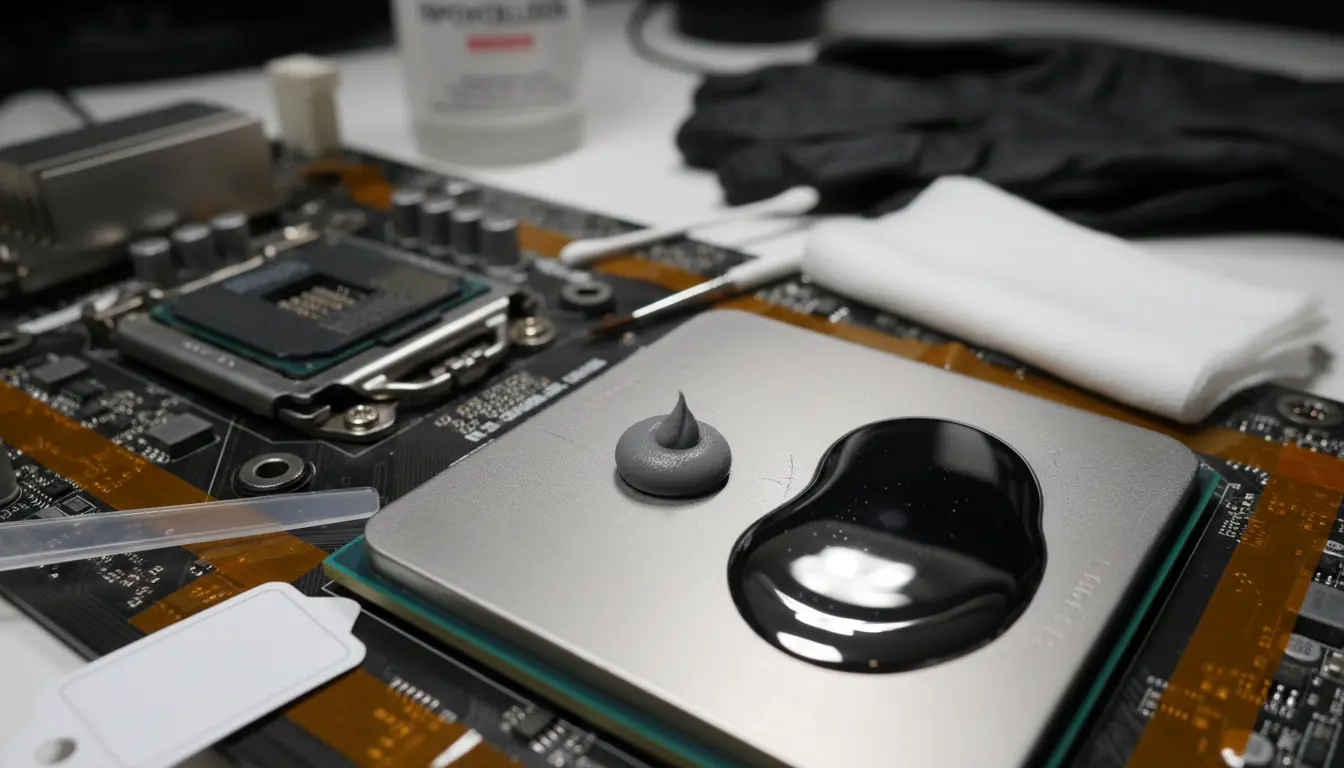

Thermal Paste vs. Liquid Metal: The Ultimate Guide to Performance, Risks, and Warranty
Choosing the right interface material for your CPU or GPU is a critical decision for PC enthusiasts, overclockers, and professional builders. While both thermal paste and liquid metal serve the same primary purpose—filling microscopic air gaps between the heat source and the cooler—they differ significantly in composition, application, and long-term consequences. This article explores the intricate balance between cooling efficiency, hardware safety, and manufacturer warranties to help you make an informed choice.
Understanding the Basics of Thermal Interface Materials (TIM)
At a microscopic level, the surfaces of a processor’s Integrated Heat Spreader (IHS) and a cooler’s baseplate are not perfectly flat. They contain “peaks and valleys” that trap air, which is a poor conductor of heat. Thermal Interface Materials (TIM) replace this air with a more conductive substance.
Standard thermal paste, often referred to as thermal grease, typically consists of a silicone base mixed with thermally conductive particles like zinc oxide or aluminum. It is non-conductive, easy to apply, and lasts for several years. On the other hand, liquid metal is composed of eutectic alloys—usually a mix of gallium, indium, and tin. Because it is a metal, its thermal conductivity is exponentially higher than traditional paste, but it brings unique challenges.


The Performance Gap: Why Liquid Metal Wins the Numbers Game
The primary reason users switch to liquid metal is the dramatic drop in temperatures. Standard high-end thermal pastes usually offer a thermal conductivity between 5 and 12 W/mK. In contrast, liquid metal products often exceed 70 W/mK.
In real-world scenarios, this translates to a temperature reduction of 5°C to 15°C, depending on the workload and the quality of the cooler. For overclockers pushing their hardware to the limit, this thermal headroom is the difference between a stable system and thermal throttling. However, for the average user running stock settings, the marginal gains of liquid metal might not outweigh the inherent risks.
The Risks of Liquid Metal: Conductivity and Corrosion
The most significant risk associated with liquid metal is its electrical conductivity. If a single drop of liquid metal touches the small capacitors or traces on a motherboard or around the CPU die, it will cause a short circuit. This often results in immediate and permanent hardware failure.
Furthermore, liquid metal is chemically aggressive toward certain materials. Gallium, the primary ingredient in most liquid metals, reacts with aluminum through a process called “gallium embrittlement.” If you apply liquid metal to an aluminum heatsink, it will literally eat through the metal, turning it into a brittle, chalky substance within hours. Liquid metal should only be used with nickel-plated copper or bare copper heatsinks, though even copper will experience some staining over time.
Thermal Paste: The Safe and Reliable Standard
Thermal paste remains the industry standard for a reason: it is nearly foolproof. Since most consumer thermal pastes are ceramic-based or carbon-based, they do not conduct electricity. If you accidentally spill some on the motherboard, you can simply wipe it off with isopropyl alcohol without fearing a short circuit.
Additionally, thermal paste is chemically inert. It does not react with aluminum or copper, making it compatible with every cooler on the market. While it may dry out over three to five years, the degradation is slow and predictable, allowing for easy maintenance cycles.
Warranty Implications: Will You Void Your Protection?
This is the “gray area” that many builders overlook. Most major hardware manufacturers, such as Intel, AMD, NVIDIA, and laptop brands like ASUS or MSI, consider the application of liquid metal a “user-induced damage” risk.
- Laptops: Many modern high-end gaming laptops now come with liquid metal pre-applied from the factory (e.g., ASUS ROG series). In these cases, the warranty remains intact as long as the factory seal isn’t broken. However, if you replace the factory paste with liquid metal yourself and a leak occurs, the warranty is void.
- Desktop CPUs: Removing the IHS (delidding) to apply liquid metal directly to the silicon die immediately voids the warranty. Even applying it on top of the IHS can be problematic; if the liquid metal stains the laser-etched serial numbers on the CPU, the manufacturer may refuse a Return Merchandise Authorization (RMA).
- GPUs: While many brands allow you to change the thermal paste on a GPU without voiding the warranty (in regions like the US due to the Magnuson-Moss Warranty Act), the presence of liquid metal is often seen as an unauthorized modification due to its corrosive nature.
Application Techniques: Precision vs. Ease
Applying thermal paste is straightforward. The “pea-size” or “X-shape” method relies on the pressure of the heatsink to spread the material. It is forgiving and requires minimal tools.
Liquid metal application is a surgical process. You must use a tiny brush or a specialized applicator to “paint” a paper-thin layer onto both the CPU and the cooler base. You must also take “containment” measures, such as applying high-temperature polyimide tape (Kapton tape) or a specialized foam barrier around the CPU die to catch any potential leaks caused by gravity or vibration.
Long-Term Maintenance and Longevity
Thermal paste is a “set it and forget it” solution. Most high-quality pastes like Arctic MX-6 or Noctua NT-H2 can last 5+ years without significant performance loss.
Liquid metal requires more attention. Over time, the gallium can “dry out” as it reacts with the copper baseplate, forming a solid alloy layer. This often requires a re-application after the first few months to ensure a stable thermal bridge. Removing old liquid metal is also significantly harder, often requiring light sanding or specialized cleaning agents.
Which One Should You Choose?
The choice depends on your risk tolerance and your specific goals.
- Choose Thermal Paste if: You want a reliable, long-lasting system with zero risk of electrical shorts. It is the best choice for 95% of users, including gamers, video editors, and general office workers.
- Choose Liquid Metal if: You are an extreme overclocker, you are delidding a CPU for maximum efficiency, or you are a professional enthusiast who understands the chemical properties of gallium and is prepared for the meticulous application process.
Conclusion
While liquid metal offers unparalleled thermal conductivity, it demands a level of precision and caution that many users find daunting. Thermal paste provides a “safety net” that protects your expensive components and keeps your warranty intact. For most, the peace of mind offered by a high-quality non-conductive paste is worth the few extra degrees in temperature.
Amazon.com Product Recommendation:
Thermal Grizzly Kryonaut Extreme (This is a top-tier high-performance thermal paste that offers near-liquid metal performance without the electrical conductivity or corrosion risks, making it the perfect middle ground for enthusiasts).









