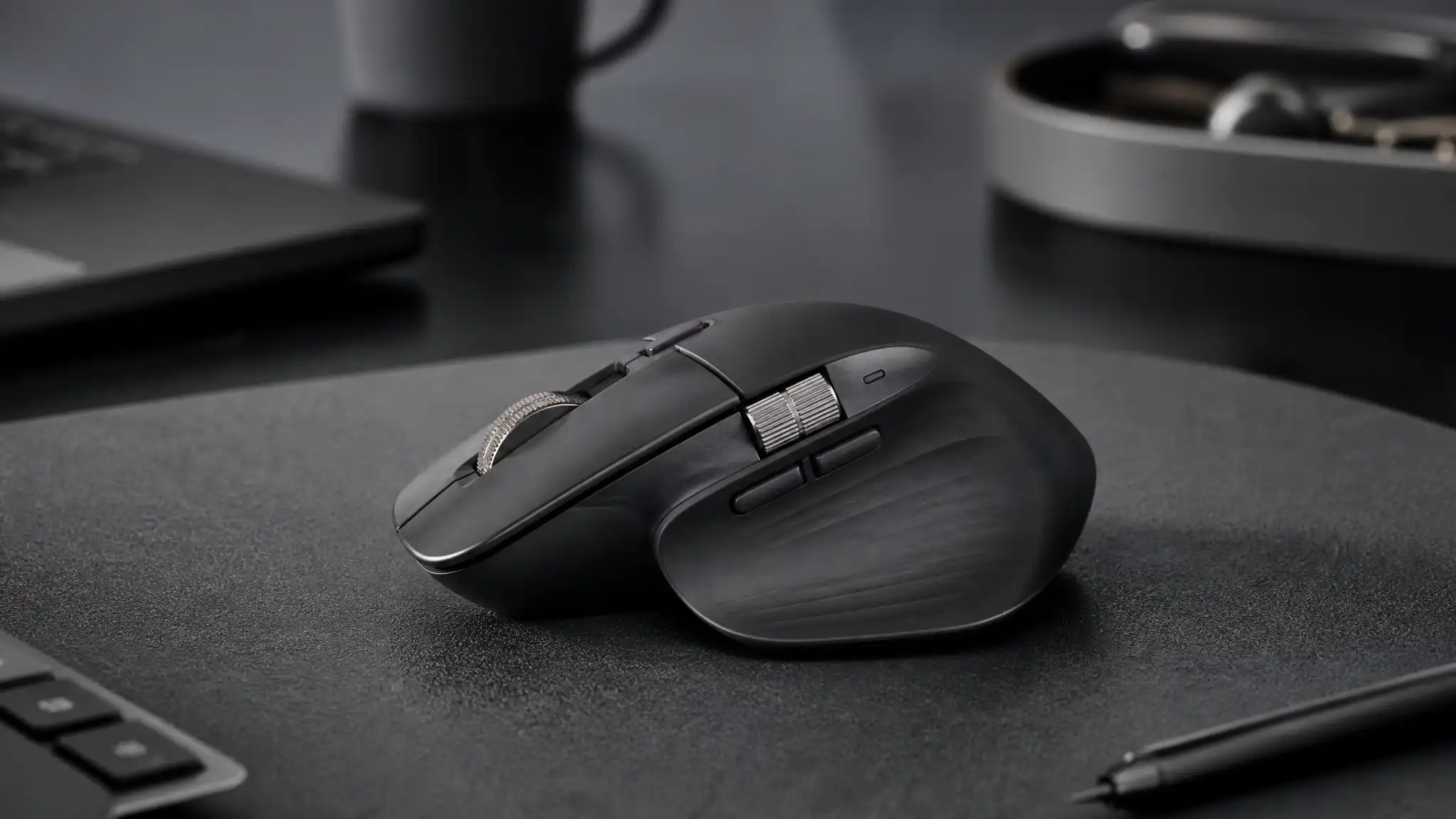

Logitech MX Master 4 Review (2026): Still the King of Productivity?
The Logitech MX Master series has dominated the productivity mouse category for years, and in 2026, the MX Master 4 enters the conversation with high expectations. Professionals, creators, remote workers, and office users all want the same thing from a mouse: comfort, speed, precision, and customization. Logitech clearly understands that demand. The company did not reinvent the formula completely, but it refined the parts that already worked and added smarter features that target serious daily use.
So, is the Logitech MX Master 4 still the king of productivity? In short, yes—if your work depends on efficiency, smooth navigation, and long-term comfort, this mouse remains one of the strongest choices on the market. It does not chase gaming trends or flashy aesthetics. Instead, it focuses on real workflow gains. That focus is exactly why so many users still consider it the best mouse for productivity.
A Familiar Design That Feels More Mature
At first glance, the MX Master 4 looks familiar. Logitech kept the sculpted right-handed shape that made earlier models so popular. That was the right decision. The body supports the palm naturally, the thumb rest reduces strain, and the button placement makes long sessions feel easier. If you spend eight or more hours at a desk, this ergonomic office mouse immediately makes sense.


The comfort level matters because productivity tools should disappear into your workflow. You should not fight your hardware. The MX Master 4 stays out of your way and lets you focus on the work itself. The shape still favors medium to large hands, and it remains a right-handed model, so left-handed users will need to look elsewhere. Still, for its target audience, the comfort is excellent.
Logitech also improved the materials. The newer finish feels more durable and easier to clean than older soft-touch coatings. That change may sound minor, but it matters over time. Premium accessories often age poorly when coatings become sticky or glossy. The MX Master 4 feels more practical, and that helps it maintain its premium office mouse identity.
The Scroll Wheel Still Sets the Standard
One reason the MX Master line keeps winning is the MagSpeed scroll wheel. Logitech continues to offer one of the most satisfying scroll experiences in the category. The wheel switches between precise ratcheted scrolling and near-frictionless free spin, which makes a huge difference when you move through long documents, spreadsheets, timelines, and research pages.
That feature alone can transform everyday work. A standard mouse wheel feels slow after you get used to this system. If you work with large Excel files, long code windows, PDFs, or project dashboards, the MagSpeed scroll wheel saves time every single day. It does not feel gimmicky. It feels useful.
The horizontal thumb wheel also remains one of the strongest advantages of this advanced workflow mouse. Editors, designers, financial analysts, and multitaskers benefit from side-to-side movement, especially when working across wide timelines or oversized spreadsheets. Logitech did not just add buttons for marketing value. It built controls that reduce repetitive friction.
Haptic Feedback Adds a Modern Layer
The biggest upgrade on the MX Master 4 is haptic feedback. Logitech uses subtle tactile responses to confirm certain actions and gestures. This feature may sound small on paper, but it adds a more responsive and modern feel in actual use. The mouse does not vibrate in an aggressive or distracting way. Instead, it gives controlled physical feedback that makes some actions feel more immediate and intentional.
This haptic feedback mouse stands out because Logitech applies the feature with restraint. That restraint matters. Too much feedback would become annoying. Here, the experience feels polished. It helps the mouse feel smarter without making it feel overengineered.
Users who rely on gestures, app switching, shortcut triggers, or custom profiles will likely appreciate this addition most. If you have never used haptic feedback in a mouse before, you may need a few days to adapt. After that, it starts to feel natural.
The Actions Ring and Custom Workflow Tools
Another major reason the MX Master 4 earns attention is its productivity-focused software ecosystem. With Logi Options+, users can customize buttons, gestures, scrolling behavior, app-specific profiles, and smart actions. This makes the mouse much more than a pointing device. It becomes a personalized control hub.
For power users, that is where the real value appears. A programmable buttons mouse saves time only when the software is easy to use and flexible enough to match your workflow. Logitech does a solid job here. You can create shortcuts for video editing, design work, browser navigation, meetings, screenshot capture, and more.
The Actions Ring adds another layer of quick access. It gives users a faster way to trigger selected commands without reaching for keyboard combinations again and again. When you repeat the same tasks all day, these micro-improvements add up. That is why many users now see the MX Master 4 as a serious mouse for creators, not just a general office accessory.
Excellent Connectivity for Modern Setups
The MX Master 4 also performs well as a multi-device Bluetooth mouse. It supports Bluetooth and Logitech’s receiver-based connection, and it can switch between multiple paired devices. That is a major advantage for people who move between a desktop, a laptop, and even a tablet during the same day.
In hybrid work environments, flexibility matters. A cross-platform mouse must work smoothly with Windows and macOS without creating setup headaches. Logitech understands that. Device switching remains one of the most useful features in the entire MX ecosystem, especially for users who manage work and personal machines side by side.
The connection feels stable, fast, and dependable for office use. This is not a high-polling-rate gaming tool, and Logitech does not pretend otherwise. Instead, it targets reliability, comfort, and intelligent workflow support. For its intended audience, that is the right priority.
Battery Life That Supports Real Work
Battery life remains one of the strongest reasons to choose the MX Master 4. Logitech promises long endurance, and that makes the device feel dependable rather than demanding. A good USB-C charging mouse should not create battery anxiety, and this one does not. The convenience of fast top-ups and extended runtime fits perfectly into professional use.
Strong MX Master 4 battery life matters because nobody wants to interrupt a workday to worry about power. Logitech has built this line around convenience, and the battery performance reinforces that strategy. It feels like a tool made for real work rather than occasional use.
USB-C charging also keeps the experience current. In 2026, that should be standard, and thankfully it is. Logitech avoids outdated charging decisions and keeps the product aligned with modern setups.
Silent Performance and Everyday Precision
Another underrated advantage is how quiet the mouse feels in daily use. A silent click mouse benefits shared offices, video calls, late-night work sessions, and any environment where constant clicking becomes irritating. Logitech makes the primary clicks muted without making them mushy. That balance is not easy to achieve.
Tracking precision also stays strong. The sensor feels accurate across common work surfaces, and the mouse remains smooth during normal productivity tasks. This is not a lightweight esports mouse, but it was never supposed to be. It is a wireless productivity mouse first, and it succeeds because it understands that role clearly.
That clarity gives the MX Master 4 a competitive edge. Many peripherals try to serve every audience and end up feeling compromised. Logitech instead focuses on professionals and productivity users who want consistency, ergonomics, and practical features.
MX Master 4 vs MX Master 3S: Should You Upgrade?
This is where the answer depends on your current setup. If you already own the MX Master 3S and feel happy with it, the MX Master 4 may feel more like a premium refinement than a must-have leap. The core shape, workflow philosophy, and general comfort remain familiar.
However, if you want haptics, deeper customization, better repairability, refreshed materials, and a more polished daily experience, the new version makes a strong case. Users coming from older mice will likely notice a bigger jump. New buyers, especially professionals building a serious desk setup, should absolutely consider the newer model first.
In other words, the MX Master 4 does not win because it changes everything. It wins because it improves the experience in smart, targeted ways.
Final Verdict: Still the Productivity King?
Yes, the Logitech MX Master 4 still deserves the crown for many users in 2026. It combines comfort, intelligent customization, strong battery life, smooth scrolling, quiet clicks, and refined modern features in one package. It is expensive, but it justifies much of that premium through daily usability.
If your work involves writing, editing, design, spreadsheets, project management, coding, research, or multitasking across multiple devices, this mouse can genuinely improve your workflow. It remains one of the clearest examples of a product that understands its audience.
The Logitech MX Master 4 is not the best choice for competitive gamers, budget shoppers, or left-handed users. But for professionals who want a reliable and feature-rich desktop tool, it still leads the category with confidence.
Amazon.com Product Recommendation
Logitech MX Master 4 Wireless Mouse









