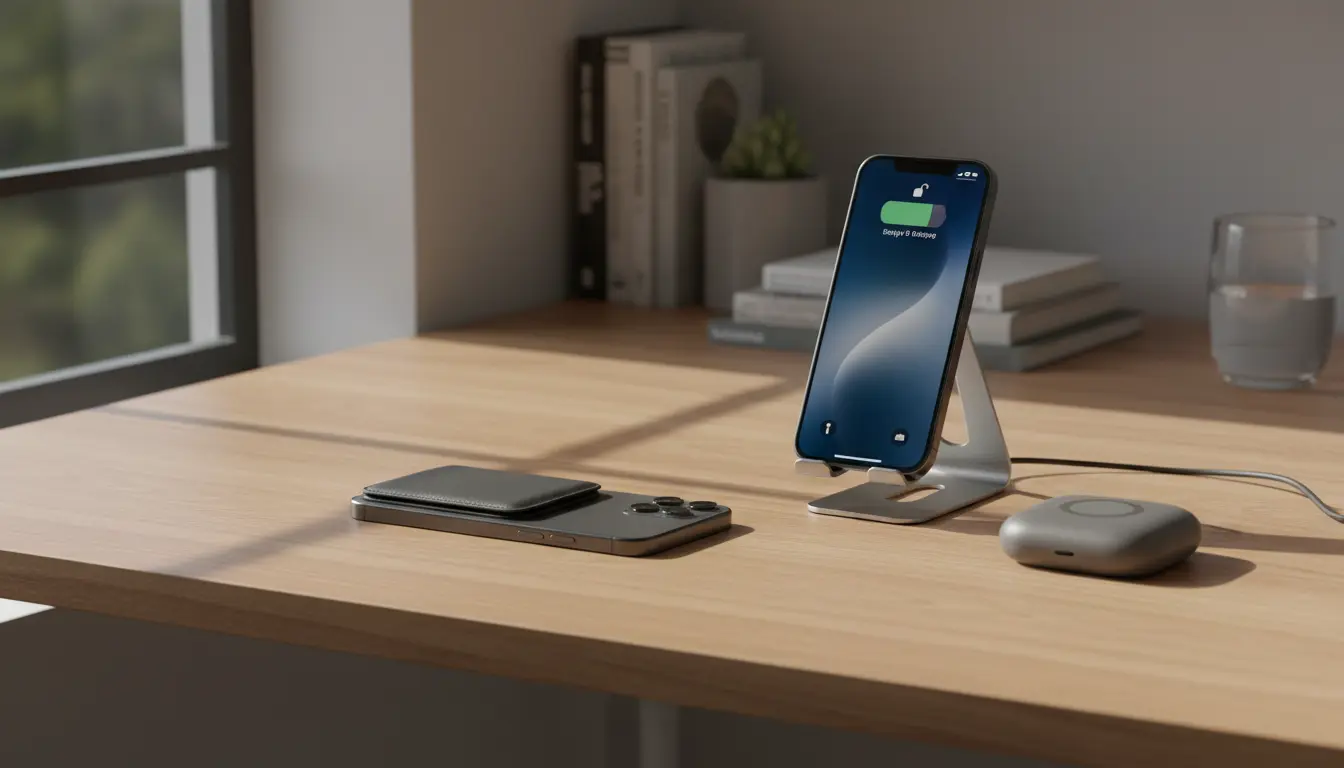

The Complete Guide to the MagSafe Ecosystem on iPhone: Wallets, Stands, and Power Banks
Apple’s MagSafe ecosystem has transformed the way iPhone users charge their devices and use accessories every day. With a ring of magnets built into the back of compatible iPhones, MagSafe enables precise alignment for fast wireless charging and lets you attach a range of accessories like wallets, stands, and power banks. Choosing the right MagSafe gear can improve your daily workflow, keep your phone secure, and even replace items you normally carry in your pockets or bag.
In this guide, you’ll learn how the MagSafe ecosystem works, what to look for in MagSafe wallets, stands, and power banks, and how to choose the best accessories for your lifestyle.
What Is MagSafe and Why Does It Matter?
MagSafe is a magnetic attachment and charging system built into newer iPhones. A circular array of magnets, combined with additional alignment magnets, ensures that compatible accessories snap into the correct position instantly. This magnetic ring surrounds the wireless charging coil and allows for:
- Stable and efficient wireless charging
- Secure attachment of accessories
- Quick and easy swapping of different MagSafe products
The result is a more seamless experience compared to traditional wireless chargers or clip‑on accessories. You don’t need to fiddle with cable positions, and your phone stays aligned for optimal charging speeds.
Benefits of Building a MagSafe Ecosystem
When you commit to a MagSafe ecosystem, your accessories start to work together rather than as separate pieces. Some key benefits include:
- Reduced bulk in your pockets or bag by combining wallet and phone
- More ergonomic viewing angles at your desk, bedside, or on the go
- Simplified charging routine using MagSafe chargers and power banks
- Consistent compatibility across iPhone generations that support MagSafe
Instead of buying random accessories, focusing on MagSafe-compatible products provides a cohesive, modular system that you can grow over time.
MagSafe Wallets: Carry Less, But Smarter
MagSafe wallets attach magnetically to the back of your iPhone or MagSafe case and are designed to replace a traditional wallet for everyday essentials.
Key Features to Look For in a MagSafe Wallet
- Magnetic strength and stability
A good MagSafe wallet should stay attached during normal use: walking, taking the phone in and out of your pocket, or using it one-handed. Look for products that explicitly mention strong magnet arrays and optimized alignment for MagSafe. - Card capacity and organization
Most MagSafe wallets hold 2–3 cards comfortably. Some offer:- Hidden slots for emergency cash
- Quick-access cutouts to slide a card out easily
- RFID-blocking layers for extra security
- Material and durability
Popular materials include:- Genuine leather for a premium feel and patina over time
- Vegan leather or fabric for lighter and often more affordable options
- Silicone or TPU for better grip and water resistance
- Secure connection and Find My support
Apple’s own MagSafe Wallet integrates with Find My, letting you see its last known location when it disconnects. Some third‑party brands now offer similar tracking via built‑in AirTag holders or slim trackers.
Who Should Choose a MagSafe Wallet?
A MagSafe wallet works best if you:
- Prefer minimal everyday carry
- Primarily pay with contactless cards or digital wallets
- Only need a few physical cards (ID, driver’s license, one bank card)
If you still carry many cards or cash, a MagSafe wallet can be an excellent companion, not a full replacement, for your traditional wallet.
MagSafe Stands: For Desks, Bedsides, and Travel
MagSafe stands keep your iPhone at a comfortable angle while maintaining a secure magnetic connection. They are ideal for productivity, video calls, and nightstands.
Types of MagSafe Stands
- Desktop stands
Designed for workspaces, desktop stands:- Hold your iPhone upright or in landscape mode
- Help you view notifications and join video calls hands‑free
- Sometimes integrate a wired or MagSafe charger for continuous charging
- Foldable and travel stands
Portable stands collapse flat and fit easily into a bag:- Great for hotel rooms, coffee shops, or flights
- Often double as both stand and MagSafe charger base
- Multi‑device MagSafe stands
These stands can charge:- iPhone via MagSafe
- Apple Watch on a dedicated puck
- AirPods with a wireless charging pad
They reduce cable clutter and act as a central charging dock for your Apple ecosystem.
How to Choose the Right MagSafe Stand
When selecting a stand, pay attention to:
- Build quality and weight: Heavier bases reduce wobble and tip‑overs.
- Viewing angles: Adjustable hinges make it easier to find your ideal viewing position.
- Charging capability: Check if it includes an official MagSafe charger or relies on your existing puck. Also verify its maximum power output.
- Case compatibility: Ensure it works with MagSafe cases and doesn’t lose magnetic strength through thicker covers.
If you often work from your phone or use it as a secondary screen, a high-quality MagSafe stand can dramatically improve your comfort and productivity.
MagSafe Power Banks: Portable Charging With No Cables
MagSafe power banks magnetically attach to the back of your iPhone to provide extra battery life without needing a separate cable. They are especially useful for travelers, heavy media consumers, and people who rely on their iPhone for navigation or work.
What to Consider When Buying a MagSafe Power Bank
- Battery capacity (mAh)
Most MagSafe power banks range from 3000 mAh to 10,000 mAh:- 3000–5000 mAh: compact, pocket-friendly, ideal for top‑ups
- 6000–10,000 mAh: bulkier but can deliver multiple charges
- Charging speed and efficiency
Look for:- Support for MagSafe-compatible 7.5W or higher wireless output
- Optional USB‑C port for faster wired charging when needed
- Clear LED indicators showing remaining capacity
- Design and comfort
Because the power bank sits on the back of your phone:- Rounded edges and slim profiles improve comfort during one‑handed use
- Non‑slip surfaces keep everything in place
- Pass‑through charging and extra features
Some advanced models offer:- Pass‑through charging: charge your iPhone and the power bank at the same time
- Built‑in kickstands, turning the battery into a stand for watching videos
- Smart power management to protect battery health
When a MagSafe Power Bank Makes Sense
You benefit most from a MagSafe power bank if you:
- Are frequently away from power outlets
- Use power‑hungry apps like video recording, gaming, or GPS
- Prefer a clean, cable‑free setup when charging on the move
Instead of dealing with tangled cords or bulky battery packs, MagSafe power banks deliver a compact, always‑aligned solution.
Building a Cohesive MagSafe Setup
To get the most from the MagSafe ecosystem, think of your accessories as parts of a system, not isolated purchases.
- Start with your priorities
Decide what matters most:- Minimal carry → prioritize a MagSafe wallet
- Better ergonomics → focus on a MagSafe stand
- All‑day battery → invest in a MagSafe power bank
- Ensure compatibility across accessories
Check that:- Your case is MagSafe‑compatible, so magnets remain strong
- Wallets, stands, and power banks don’t interfere with each other’s attachment points
- You can quickly detach and swap accessories without damaging the case surface
- Choose trusted brands and certified products
Accessories that follow Apple’s Made for MagSafe guidelines typically deliver:- Stronger and safer magnetic connections
- Better charging performance
- More reliable long‑term durability
By planning your ecosystem, you avoid buying duplicate or incompatible accessories and end up with a setup that feels tailored to your routine.
Recommended MagSafe Accessory on Amazon
For a balanced combination of portability, functionality, and reliability, many users choose a MagSafe-compatible magnetic power bank with a built‑in kickstand on Amazon.com. Look for a model that offers:
- Around 10,000 mAh capacity for multiple charges
- Strong MagSafe-compatible magnets
- An integrated fold-out stand for watching content hands‑free
- USB‑C input/output for flexible wired charging
This type of product effectively replaces a separate portable charger and a travel stand, giving you a compact, versatile companion for everyday use and travel.









