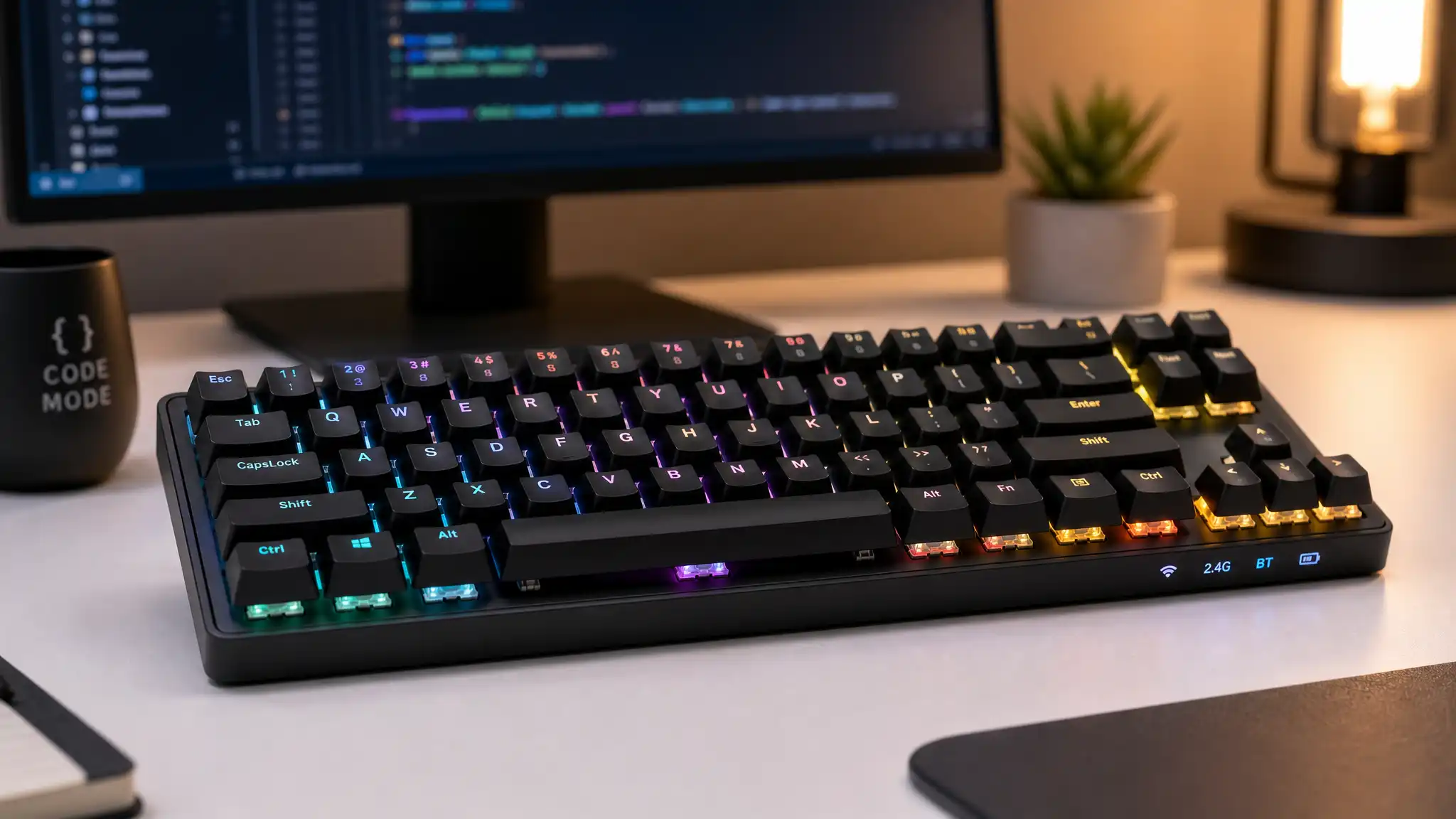

The Typing Revolution for Developers
In the world of programming, where thousands of lines of code flow from fingertips daily, the keyboard becomes more than just an input device—it transforms into a developer’s most trusted companion. Keychron mechanical keyboards have emerged as the go-to choice for coders worldwide, offering a perfect blend of tactile feedback, durability, and wireless convenience that traditional membrane keyboards simply cannot match.
Understanding Mechanical Keyboard Technology
Mechanical switches represent a fundamental shift in how we interact with our computers. Unlike rubber dome keyboards that rely on a single membrane layer, mechanical key switches feature individual spring-loaded mechanisms beneath each keycap. This design delivers consistent actuation force, precise keystroke registration, and satisfying tactile or auditory feedback that programmers have grown to love.
Keychron has mastered this technology by offering multiple switch options—Gateron, Cherry MX compatible, and their own proprietary switches—allowing developers to customize their typing experience based on personal preference. Whether you prefer the clicky Blue switches for auditory confirmation, the tactile Brown switches for balanced feedback, or the smooth Red switches for rapid-fire coding sessions, Keychron provides options that cater to every coding style.

Ergonomic Design That Prevents Repetitive Strain
Professional developers spend eight to twelve hours daily at their workstations, making ergonomic considerations crucial for long-term health. Keychron keyboards feature adjustable typing angles through flip-out feet, enabling users to find their optimal wrist position. This seemingly simple feature significantly reduces the risk of carpal tunnel syndrome and repetitive strain injuries that plague many software engineers.
The compact 75% and 65% layouts that Keychron specializes in also promote better ergonomics by reducing shoulder strain. With a smaller footprint, your mouse sits closer to your keyboard, eliminating the awkward reaching motion that full-sized keyboards force upon users. This tenkeyless design philosophy has become increasingly popular among programmers who rarely use numeric keypads but value desk space and proper arm positioning.
Wireless Freedom Meets Wired Reliability
One of Keychron’s standout features is their dual-mode connectivity. These keyboards seamlessly switch between Bluetooth wireless mode and USB-C wired connection, offering flexibility that matches modern development workflows. When you’re coding on your laptop at a coffee shop, Bluetooth mode provides cable-free convenience. Back at your desktop workstation, a simple cable connection ensures zero latency and eliminates battery concerns during marathon debugging sessions.
The battery life on Keychron wireless keyboards is impressive, often lasting weeks on a single charge with moderate use. This reliability means you won’t experience the frustration of your keyboard dying mid-compilation or during an important code review session.
Multi-Device Pairing for Modern Workflows
Today’s developers juggle multiple devices—a primary workstation, a laptop for meetings, perhaps a tablet for documentation review. Keychron keyboards support multi-device pairing, allowing you to connect up to three devices simultaneously and switch between them with a simple key combination. This feature proves invaluable when you’re developing on your main machine but need to quickly respond to messages on your laptop or test code on a secondary system.
Hot-Swappable Switches: Customization Without Soldering
Many Keychron models feature hot-swappable sockets, enabling users to change mechanical switches without any soldering knowledge. This innovation allows programmers to experiment with different switch types as their preferences evolve. Perhaps you start with clicky switches but later prefer quieter options for shared office spaces—hot-swappable keyboards make this transition effortless and cost-effective.
RGB Backlighting for Late-Night Coding Sessions
Programmers often work during unconventional hours when inspiration strikes or deadlines loom. Keychron’s RGB backlighting isn’t just aesthetic—it’s functional. Customizable per-key lighting helps you locate specific keys in dim environments, while different lighting profiles can indicate which device you’re currently connected to or which layer you’re using for custom macros.
Mac and Windows Compatibility
Unlike many mechanical keyboards designed primarily for Windows users, Keychron keyboards offer genuine cross-platform support. They include both Windows and Mac keycaps, with system-specific key layouts that work seamlessly with either operating system. For developers who work in mixed environments or switch between platforms, this compatibility eliminates the frustration of remapping keys or dealing with non-functional modifier keys.
Build Quality That Justifies the Investment
Keychron constructs their keyboards with aluminum frames and high-quality ABS or PBT keycaps that resist shine and wear. This durability means your keyboard will maintain its appearance and functionality through millions of keystrokes. For professional coders, this represents a long-term investment that pays dividends in reliability and consistent performance.
The stabilizers on larger keys like the spacebar and shift keys are well-lubricated from the factory, reducing rattle and ensuring smooth keypresses across the entire board. This attention to detail separates quality mechanical keyboards from budget alternatives that may technically feature mechanical switches but lack the refinement that makes typing truly enjoyable.
Programmable Layers and Custom Macros
Advanced Keychron models support QMK and VIA firmware, giving programmers unprecedented control over their keyboard’s behavior. You can create custom layers that activate different key functions when holding specific modifier keys, program complex macros to automate repetitive coding tasks, or remap keys to match your preferred workflow.
This programmability proves especially valuable for developers working with specialized IDEs or those who frequently use terminal commands. Instead of memorizing obscure key combinations, you can program single-key shortcuts for your most common operations.
The Sound and Feel That Boosts Productivity
There’s something deeply satisfying about the acoustic feedback of mechanical switches. That distinct click or thock sound provides immediate confirmation that your keypress registered, reducing typing errors and increasing confidence. Many programmers report that this tactile and auditory feedback helps them enter a flow state more easily, where code seems to pour effortlessly from their minds through their fingers.
The typing experience on a quality mechanical keyboard like Keychron models also reduces finger fatigue. The consistent actuation force means your fingers don’t need to bottom out keys with excessive force, allowing for lighter, faster typing that feels less tiring during extended coding sessions.
Community and Ecosystem Support
Keychron has cultivated a vibrant community of enthusiasts who share custom configurations, keycap designs, and modification guides. This ecosystem means you’re never alone when troubleshooting issues or seeking to optimize your setup. The availability of third-party keycap sets, custom cables, and carrying cases specifically designed for Keychron keyboards demonstrates the brand’s popularity and staying power.
Cost-Effectiveness Compared to Premium Alternatives
While Keychron keyboards aren’t the cheapest option available, they occupy a sweet spot between budget mechanical keyboards and ultra-premium custom builds. You receive professional-grade features, excellent build quality, and genuine mechanical switches at a price point that most developers find reasonable—typically ranging from $70 to $180 depending on the model and features.
This pricing makes Keychron keyboards accessible to junior developers just starting their careers while still satisfying the demands of senior engineers who’ve tried numerous alternatives. The value proposition becomes even clearer when you consider the keyboard’s longevity and the productivity gains from improved typing comfort.
Recommended Product: Keychron K2 Wireless Mechanical Keyboard
For developers seeking the perfect balance of features, portability, and value, the Keychron K2 Wireless Mechanical Keyboard (available on Amazon.com) stands out as an exceptional choice. This 75% layout keyboard includes dedicated arrow keys and a function row that many programmers consider essential, while maintaining a compact footprint that saves desk space. With hot-swappable Gateron switches, Mac and Windows compatibility, RGB backlighting, and up to 240 hours of battery life, the K2 delivers everything a coder needs in a single, well-designed package. Its aluminum frame ensures durability, while the wireless connectivity with multi-device pairing makes it perfect for developers who work across multiple machines throughout their day.
Conclusion: Investing in Your Primary Tool
Your keyboard is the primary interface between your thoughts and the code that brings them to life. Choosing a Keychron mechanical keyboard isn’t merely about following trends—it’s about investing in a tool that enhances your daily work experience, protects your long-term health, and potentially increases your productivity through improved typing comfort and accuracy. For coders who spend countless hours at their keyboards, the question isn’t whether a Keychron is worth it, but rather which model best suits their specific needs.









