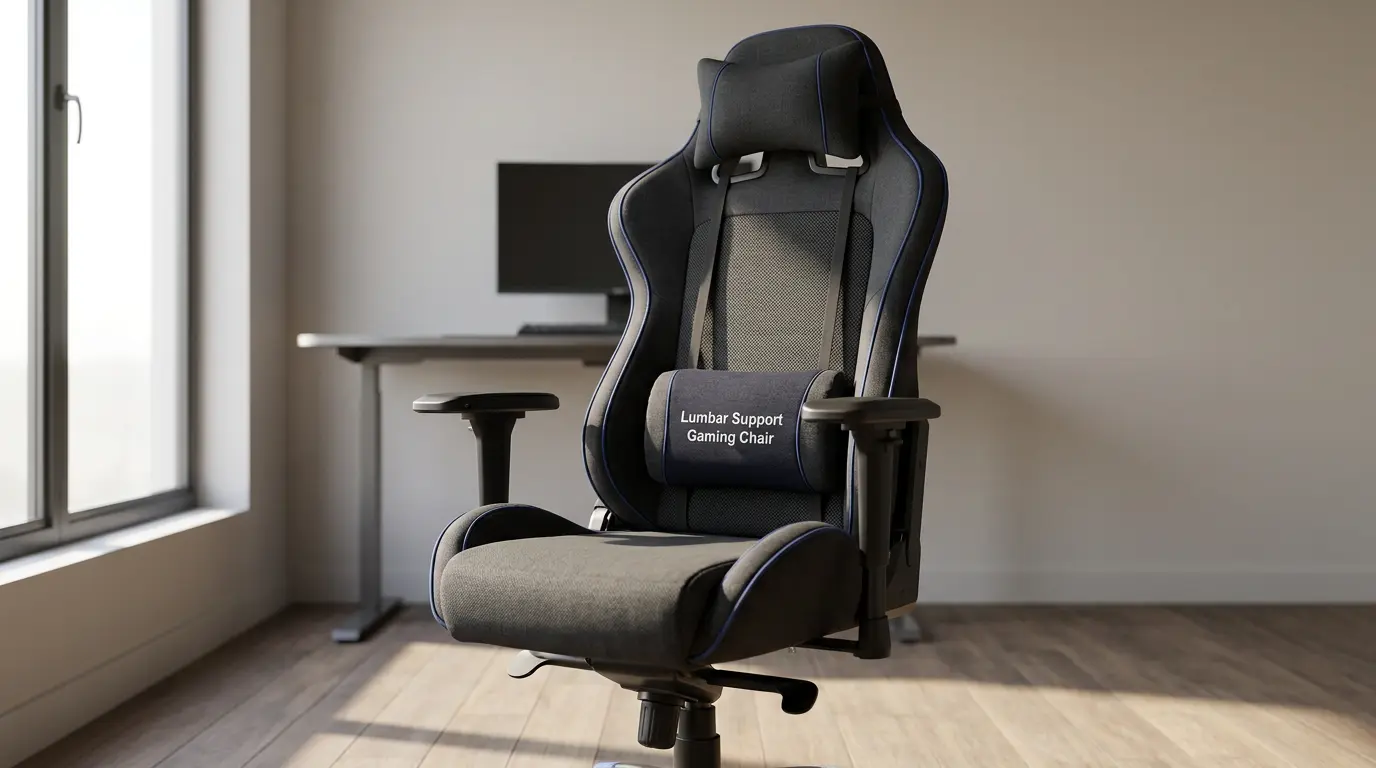

Best Ergonomic Gaming Chairs for Long Sessions: A Complete Back Support Guide
Gaming for hours can feel exciting, immersive, and rewarding, but your body often pays the price when your chair does not support you properly. Many gamers focus on graphics cards, monitors, and desk setups, yet they ignore the one item that affects comfort the most: the chair. If you spend long evenings gaming, streaming, editing, or working at the same desk, you need a chair that protects your spine, improves posture, and reduces muscle fatigue.
The best ergonomic gaming chairs for long sessions do much more than look stylish. They support your lower back, keep your shoulders relaxed, and help you maintain a healthy sitting position. A strong chair can reduce pressure on your hips, align your spine, and prevent the discomfort that builds up during marathon gaming sessions.
In this guide, you will learn what makes a gaming chair ergonomic, which features matter most for back support, and how to choose a model that delivers long gaming sessions comfort without sacrificing style.
Why Ergonomics Matter During Long Gaming Sessions
When you sit for several hours, your back, neck, and hips absorb constant pressure. If your chair lacks structure, your body starts to compensate. You lean forward, round your shoulders, tilt your pelvis, and strain your lower back. Over time, this creates stiffness, tension, and poor posture.
An ergonomic chair solves this problem by supporting your body where it needs help the most. A good lumbar support gaming chair encourages a natural spinal curve instead of forcing your back into a flat, stressful position. It also keeps your posture stable while allowing small adjustments throughout the day.
This matters because comfort is not just about softness. A chair can feel plush for the first 20 minutes and still create pain after two hours. Real ergonomics focus on posture support, movement, and pressure distribution. That is why a posture support chair often feels better over time than an overly padded seat with no real structure.
The Most Important Feature: Lumbar Support
If you care about back health, start with lumbar support. Your lower spine naturally curves inward. A chair should support that curve instead of flattening it. Without proper lower back support, your muscles work harder to hold you upright, and fatigue appears much faster.
The best models include either built-in adjustable lumbar support or a separate lumbar cushion. Built-in systems usually provide better consistency because they move with the chair and align more precisely with your spine. A detachable cushion can still work well, but only if it stays in place and matches your body shape.
A high-quality back pain relief chair should let you adjust the lumbar position based on your height and torso length. This small feature makes a huge difference during long sessions. It reduces slouching, protects the lower back, and improves spinal alignment seating from the start of your session to the end.
A High Back Design Supports More Than Your Spine
A high back gaming chair does more than create a racing-style look. It supports the upper back, shoulders, and neck, especially when you lean back between matches or during breaks. If the backrest ends too low, your shoulders lose support and your upper spine starts to tense up.
Look for a backrest that follows the natural curve of your body. A well-shaped ergonomic design supports the full back without forcing your shoulders inward. Many users also benefit from a neck support pillow, especially if they tend to lean back while watching content, using a controller, or relaxing between tasks.
However, the neck pillow should complement the chair, not fix bad structure. If the chair’s back shape feels wrong without the pillow, the design may not truly fit your body.
Seat Cushion, Seat Depth, and Pressure Relief
Many buyers only test the backrest and forget the seat. That is a mistake. If the seat feels too hard, too flat, or too deep, your lower body suffers. A strong ergonomic seat cushion distributes your weight evenly and reduces pressure on the hips and thighs. This helps blood circulation and keeps your legs from going numb during extended play.
Seat depth also matters. If the seat is too long, it presses against the back of your knees. If it is too short, it fails to support your thighs. Ideally, you should sit back fully while leaving a small gap between the seat edge and the back of your knees.
Some users prefer a memory foam gaming chair because memory foam molds to the body and can feel more supportive over long periods. Others like firmer foam because it holds shape better and prevents sinking. Neither option is automatically superior. The key is balanced support, not extreme softness.
Adjustable Armrests Can Save Your Shoulders
Your arms influence your posture more than most people realize. If your armrests sit too low, your shoulders slump. If they sit too high, your shoulders stay raised and tense. That is why adjustable armrests are essential in any serious ergonomic setup.
The best gaming chairs often include 2D, 3D, or 4D armrests. Among these, 4D armrests offer the most flexibility because they move up, down, inward, outward, forward, and backward. This helps you position your elbows close to your body and keep your wrists neutral while gaming or typing.
Armrest adjustment becomes even more important if you switch between keyboard-and-mouse gaming, controller gaming, and office work. A chair with fixed arms may look fine, but it rarely adapts well across multiple use cases.
Recline, Tilt, and Dynamic Sitting
A reclining gaming chair offers more than relaxation. Recline allows your body to shift pressure points and change posture throughout the day. Static sitting creates fatigue, while dynamic sitting encourages small movements that reduce tension.
That said, the best angle for long sessions is not a dramatic recline. Most people feel best when sitting between upright and slightly reclined. A backrest that tilts naturally with your body helps maintain support while reducing lower back stress.
Some models also include a footrest gaming chair design. A footrest can feel helpful during breaks, casual play, or content viewing. However, it should not distract you from the chair’s core ergonomic quality. A poor chair with a footrest is still a poor chair. Prioritize lumbar support, seat quality, and adjustability first.
Breathable Materials and Build Quality Matter
Back support alone will not save a chair if the materials trap heat or wear out quickly. Breathable upholstery helps you stay comfortable during long sessions, especially in warmer rooms. Fabric and mesh-style surfaces often feel cooler than traditional synthetic leather, although premium PU materials can still perform well if ventilation and padding are designed properly.
Build quality also affects long-term support. Cheap foam compresses quickly. Weak frames lose stability. Thin cushions flatten and reduce ergonomic value over time. A chair may look impressive in photos, but if it cannot maintain support after a few months, it becomes a poor investment.
Always check the base, frame, foam density, and weight capacity gaming chair rating before buying. A chair should support your body size without creaking, wobbling, or wearing down too fast. If you are taller or heavier, never ignore the listed capacity and seat dimensions.
How to Choose the Right Chair for Your Body
The best ergonomic chair is not simply the most expensive one. It is the one that fits your frame, desk height, and daily routine. A smaller user may need a narrower seat and lower lumbar position. A taller user may need a longer backrest and deeper seat. A heavier user may benefit from reinforced structure and wider dimensions.
Before you buy, ask these questions:
- Does the lumbar support align with my lower back?
- Do the armrests let my shoulders stay relaxed?
- Does the seat support my thighs without pressing my knees?
- Does the backrest support my upper back and neck?
- Does the chair encourage posture instead of forcing stiffness?
These questions help you filter out chairs that only look ergonomic from a distance.
Good Posture Still Requires Good Habits
Even the best chair cannot fix bad sitting habits by itself. You still need to sit all the way back, keep your feet grounded, and position your monitor at eye level. Your knees should stay close to a 90-degree angle, and your elbows should rest comfortably near your sides.
Take short movement breaks every 45 to 60 minutes. Roll your shoulders, stand up, stretch your hips, and reset your posture. These small habits keep your muscles active and help your ergonomic chair do its job properly.
If you combine a strong chair with a smart desk setup and better movement habits, you will notice real improvement in comfort, focus, and recovery.
Final Thoughts
The best ergonomic gaming chairs for long sessions blend structure, adjustability, and comfort. They do not just make your setup look better; they protect your back, improve posture, and support performance. When you choose the right chair, you reduce fatigue, maintain better alignment, and enjoy longer sessions with less strain.
Focus on lumbar support, armrest adjustment, seat comfort, breathable materials, and proper fit. Avoid flashy features that add visual appeal but ignore body mechanics. A truly ergonomic chair should support you actively, not just cushion you passively.
If you spend hours at your desk every week, this is not a luxury purchase. It is a daily support system for your spine, shoulders, and long-term comfort.
Amazon.com Product Recommendation
A budget-friendly option worth checking is the BestOffice High-Back Gaming Chair on Amazon. According to the Amazon listing, it includes adjustable lumbar support, a headrest pillow, and a 90–125° recline, which makes it a practical entry-level choice for users who want better back support without overspending.