
Best Mechanical Keyboards for Gamers in Indiana: The 2026 Guide
Why Your Keyboard Matters More Than Your GPU
Every serious gamer in the Hoosier State eventually asks the same question: which keyboard will give me the edge? The answer is rarely the flashiest board on the shelf. It is the one that matches your play style, your desk, and your budget. This guide breaks down the best mechanical keyboards for gamers in Indiana, explains the features that actually matter, and points you to a reliable pick you can order today.
Indiana gamers know the truth: your keyboard is the bridge between your brain and your battleground. Whether you grind ranked matches in Indianapolis, stream from a dorm room in Bloomington, or build your dream setup in Fort Wayne, the board under your fingers decides how fast you react, how accurate you aim, and how comfortable you stay through a five-hour session. Long Indiana winters keep many of us indoors, which means more gaming hours and more wear on our gear. A membrane keyboard simply cannot keep up. Mechanical switches register presses faster, survive tens of millions of keystrokes, and give you the tactile confidence that every input landed. Upgrading your keyboard delivers a bigger performance jump than almost any other peripheral purchase, and it costs far less than a new GPU.
What to Look For in a Gaming Keyboard
Choose the Right Gaming Keyboard Switches
Switches define the feel of your board. Linear switches, usually red, travel smoothly with no bump, making them the favorite for fast FPS play because nothing interrupts the keystroke. Tactile switches, usually brown, offer a small bump at the actuation point, which suits typing, MOBAs, and all-day use. Clicky switches, usually blue, add an audible click for maximum feedback, though they can annoy teammates on voice chat. Most serious players start with linear switches and experiment from there. Pay attention to actuation force too: lighter switches around 45 grams feel snappy, while heavier ones prevent accidental presses.
Pick a Layout That Fits Your Desk
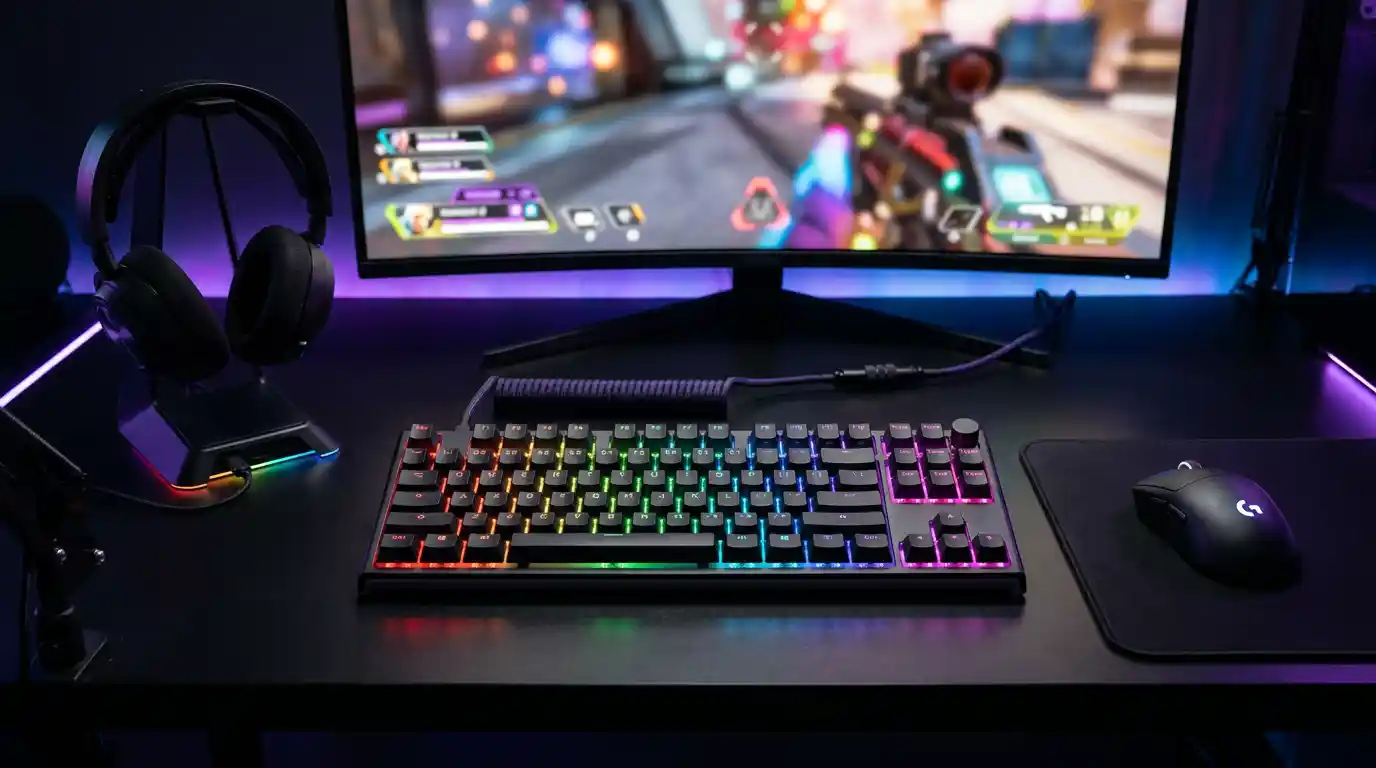
Full-size boards include the numpad, but they eat desk space and push your mouse away. A tenkeyless keyboard drops the numpad and gives your mouse room to move, a real advantage at low sensitivity. Compact 75% and 60% layouts shrink the footprint further for tournament bags and cramped dorm desks. Think about your games: if you bind items to the numpad, keep it; if you flick your mouse across the mat, cut the clutter.
Hot-Swappable Keyboards Future-Proof Your Setup
Hot-swappable keyboards let you pull out switches and install new ones without soldering. Start with budget switches, then upgrade to premium ones later for a fraction of the cost of a new board. This single feature turns a $50 keyboard into a lifelong platform. It also makes repairs simple: a dead switch costs a dollar instead of a whole new keyboard.
Don’t Overlook RGB Backlighting and Build Quality
RGB backlighting does more than look cool. It helps you find keys in a dark room, and it syncs with your other gear for an immersive setup. Look for double-shot PBT keycaps, which resist shine and wear far better than cheap ABS plastic. Anti-ghosting and N-key rollover ensure every simultaneous press registers, which matters when you spam abilities mid-fight. A metal top plate adds weight and stability, so the board stays put during intense matches.
Consider a Wireless Mechanical Keyboard
Modern 2.4GHz wireless delivers latency that rivals wired connections, and battery life now stretches for weeks with the lighting off. A wireless mechanical keyboard keeps your desk clean and lets you switch between your PC, laptop, and tablet with one keystroke. Bluetooth works fine for casual play, but competitive gamers should stick to the 2.4GHz dongle.
Build an Ergonomic Gaming Setup
An ergonomic gaming setup protects your wrists during marathon sessions. Pair your keyboard with a padded wrist rest, keep your elbows at 90 degrees, and position the board so your forearms stay level. Compact layouts help here too: they let you keep your mouse closer to your body, reducing shoulder strain.
Best Mechanical Keyboards for Gamers in Indiana
Best Budget Pick: Redragon K552
The Redragon K552 delivers a metal frame, anti-ghosting, and satisfying switches for around $35. It is the classic entry point for Indiana gamers who want mechanical performance without breaking the bank. PCMag’s budget favorite, the Keychron C3 Pro, is another strong option with hot-swap sockets and gasket mounting at a similar price. Both prove that budget mechanical keyboards no longer mean cheap feel.
Best All-Rounder: Asus ROG Strix Scope II 96 Wireless
Tom’s Hardware names the Asus ROG Strix Scope II 96 Wireless the best gaming keyboard overall. It packs a near-full-size layout with a numpad into a compact frame, offers hot-swappable switches, and delivers roughly 1,500 hours of battery life. For Indiana gamers who also work from home, this board does double duty beautifully.
Best for Competitive Play: Wooting 80HE
RTINGS ranks the Wooting 80HE as the best gaming keyboard it has tested. Its Hall effect switches let you adjust actuation distance per key and re-register presses the instant your finger lifts. If you take ranked play seriously, this is the edge you have been looking for.
Where to Buy in Indiana
Amazon offers the widest selection and fastest delivery to most Indiana addresses, and Prime members often get next-day shipping. For hands-on testing, visit Micro Center in Indianapolis or your local Best Buy to feel switches before you buy. College esports clubs across the state also share honest opinions about what actually holds up under daily play. Keep an eye on seasonal sales, too. Black Friday and back-to-school deals regularly cut 20 to 30 percent off popular models, and Amazon’s Lightning Deals rotate daily. If you prefer to support local shops, several independent computer stores in the state carry enthusiast boards, and their staff usually let you test the switches in person. Whatever route you choose, buy from a seller with a solid return policy so you can swap boards if the feel is wrong.
Final Thoughts
The best mechanical keyboards for gamers in Indiana share one trait: they disappear into the game. Start with a solid budget board, choose linear or tactile switches, and prioritize hot-swap support so you can grow. Remember that sound matters as much as feel. If you share a house or an apartment, quieter linear switches and foam-dampened cases keep the peace during late-night raids. And when your skills improve, your keyboard should grow with you, which is why hot-swap support and software remapping matter more than fancy branding. Add a wrist rest, clean your board monthly, and your fingers will thank you after every long session.
Amazon Product Recommendation: Redragon K552 Mechanical Gaming Keyboard — This budget-friendly entry-level keyboard features an 87-key tenkeyless design, a durable metal frame, anti-ghosting technology, and red linear switches. It is an excellent starting point for gamers in Indiana.