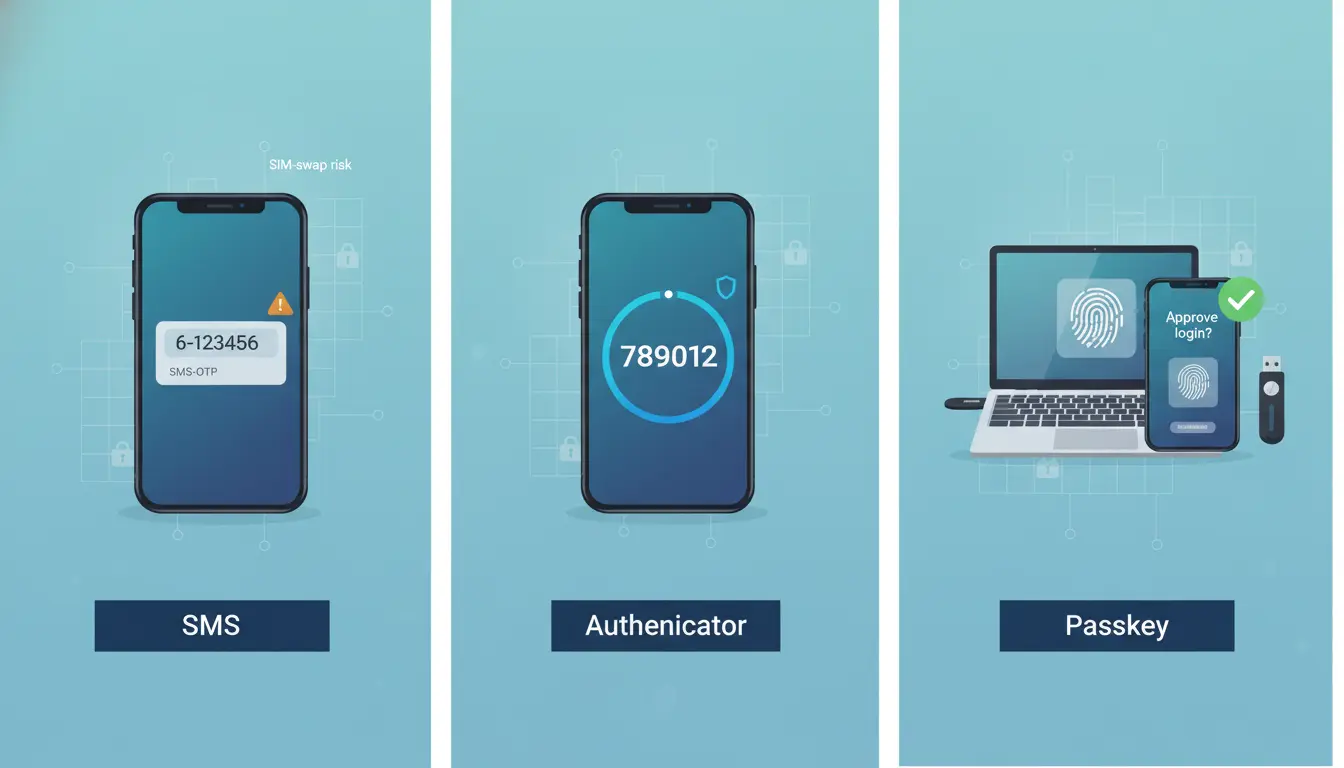

As cyber threats rise and credential stuffing becomes rampant, organizations and individuals are moving beyond passwords to layered defenses like two-factor authentication (2FA) and multi-factor authentication (MFA). Yet not all MFA methods are equal. SMS codes, authenticator apps (TOTP), and passkeys offer distinct trade-offs in security, usability, and deployability. This guide explains how each method works, where each shines or falls short, and how to choose the right mix for strong, user-friendly authentication—optimized for both modern security standards and organic SEO.
What Is MFA and Why It Matters
MFA adds at least one extra verification step to your login, combining:
- Something you know: a password or PIN.
- Something you have: a phone, hardware key, or secure element.
- Something you are: biometrics (fingerprint, face).
This layered approach blocks the majority of account takeover attempts, even when passwords are compromised through phishing or data breaches. For businesses, MFA reduces risk, helps meet compliance requirements, and protects critical assets without heavily disrupting user flows.


Method 1: SMS-Based 2FA
SMS 2FA sends a one-time code (OTP) to your phone number, which you enter to complete login.
Pros:
- Ubiquitous and simple: No app required; works on basic phones.
- Fast rollout: Minimal IT overhead and low friction for first-time users.
Cons:
- Security weaknesses: Vulnerable to SIM swapping, SS7 network interception, phishing relay attacks, and SMS forwarding.
- Dependence on carrier availability and phone number continuity.
- Regulatory and roaming issues for international users.
Best for:
- Low- to medium-risk accounts.
- Transitional phases where you need broad coverage quickly.
- Users who cannot install apps or use modern devices.
Risk-mitigation tips:
- Pair with risk-based authentication (step up only when risk is high).
- Enforce number change verification and monitor SIM-swap signals.
- Encourage migration to stronger factors over time.
Method 2: Authenticator Apps (TOTP)
Time-based One-Time Passwords (TOTP) are generated locally on a device by apps like Google Authenticator, Microsoft Authenticator, or Authy. The codes refresh every 30 seconds, and enrollment is done by scanning a QR code.
Pros:
- Better security than SMS: Codes are offline and not tied to phone networks.
- Broad compatibility: Works across many platforms and identity providers.
- Cost-effective: No carrier fees or SMS delivery issues.
Cons:
- Phishable: Users can still be tricked into disclosing TOTP codes on fake sites.
- Device loss headaches: Recovery requires backup codes or secure cloud sync.
- Usability friction: Requires code entry and app switching.
Best for:
- Medium- to high-risk accounts.
- Environments where SMS is unreliable or non-compliant.
- Users comfortable installing and managing apps.
Hygiene and hardening:
- Provide printable backup codes and educate on safe storage.
- Offer secure multi-device sync or enterprise-managed backup.
- Add phishing-resistant checks (origin binding, verified links, FIDO2 for admins).
Method 3: Passkeys (FIDO2/WebAuthn)
Passkeys are a passwordless, phishing-resistant factor built on public-key cryptography. The private key is stored securely on a user device or hardware security key, and login is approved via biometrics or device PIN. Passkeys can sync via platform clouds (Apple, Google, Microsoft) or be stored on hardware keys (e.g., YubiKey) for portable, high-assurance use.
Pros:
- Strongest practical security: Resistant to phishing, replay, and credential stuffing. No shared secrets to steal.
- Excellent UX: No codes to type; fast biometric approval.
- Standards-based: Backed by major platforms and browsers.
Cons:
- Ecosystem maturity: Enterprise rollout planning needed (device trust, recovery).
- Recovery and portability: Cloud-synced passkeys are convenient but require account hygiene; hardware keys need distribution and spares.
- Legacy compatibility: Older systems may need bridges or phased upgrades.
Best for:
- High-risk roles (admins, finance, executives) and high-value consumer accounts.
- Organizations targeting passwordless strategies.
- Mobile-first experiences where friction must be minimal.
Deployment guidance:
- Start with phishing-resistant MFA for admins (passkeys or security keys).
- Offer synced passkeys as default, hardware keys for high assurance or travel.
- Provide clear recovery paths (secondary device, backup hardware key, helpdesk with step-up verification).
Security vs. UX: What Trade-offs Make Sense?
- Highest security, low friction: Passkeys. Ideal when supported by your user base and platform stack.
- Balanced security and accessibility: TOTP authenticator apps. Good for broad deployment.
- Maximum reach with minimal setup: SMS codes. Acceptable as a temporary or fallback factor, not a final destination.
A layered approach is often best:
- Tier 1 (admins and sensitive roles): Passkeys or hardware security keys only.
- Tier 2 (general workforce): Passkeys preferred; TOTP as fallback.
- Tier 3 (long-tail users/customers): TOTP or SMS as on-ramp, with nudges toward passkeys.
Phishing Resistance: The Critical Differentiator
- SMS and TOTP can be phished. Attackers can proxy sessions and harvest codes in real time.
- Passkeys bind authentication to the legitimate domain via WebAuthn, blocking generic phishing pages and MFA fatigue attacks.
For organizations facing targeted phishing or BEC threats, prioritize passkeys/hardware keys for privileged access.
Recovery, Backup, and Device Lifecycle
- SMS: If a number is reassigned or SIM-swapped, attackers may receive your codes. Use out-of-band checks for number changes.
- TOTP: Encourage backup codes, secure app transfer, or enterprise-managed backup. Train users to rotate secrets if lost.
- Passkeys: Offer multiple passkeys (e.g., phone + laptop), backup hardware keys for high assurance users, and robust helpdesk flows with strong identity proofing.
Document and test recovery procedures. Most security incidents turn into availability issues if recovery is unclear.
Compliance and Risk Considerations
- Many frameworks (SOC 2, ISO 27001, PCI DSS) expect MFA for administrative access.
- Some regulations discourage SMS for high-assurance authentication due to known vulnerabilities.
- Passkeys align well with phishing-resistant mandates and zero trust strategies.
Perform a risk assessment:
- Threat model (phishing likelihood, insider risk, device theft).
- User context (BYOD prevalence, platform mix, travel).
- Operational constraints (support capacity, cost, time-to-deploy).
Rollout Strategy: Practical Steps
- Inventory authentication surfaces: VPN, IdP/SSO, admin consoles, critical SaaS.
- Secure the crown jewels first: Enforce phishing-resistant MFA for admins.
- Offer passkeys by default, TOTP as fallback; de-emphasize SMS gradually.
- Educate users with in-product prompts, short videos, and clear recovery steps.
- Monitor adoption and failures; apply risk-based step-up for anomalies.
- Set timelines: sunset SMS for high-risk flows; require stronger factors on sensitive apps.
Quick Comparison
- Security:
- SMS: Low to medium (susceptible to SIM swap and phishing)
- TOTP: Medium to high (offline codes, still phishable)
- Passkeys: Very high (phishing-resistant, cryptographic binding)
- Usability:
- SMS: Easy but inconsistent delivery
- TOTP: Reliable, minor friction entering codes
- Passkeys: Fastest and easiest once enabled
- Deployment:
- SMS: Easiest to start
- TOTP: Moderate setup, low cost
- Passkeys: Planning required, best long-term
Bottom Line
If you can implement passkeys, do it—especially for administrative and high-value accounts. Supplement with TOTP for compatibility and as a fallback. Keep SMS only where necessary for reach, while guiding users to stronger, phishing-resistant factors. This layered, user-centric approach maximizes protection and keeps login experiences smooth.








